bohman#
- scipy.signal.windows.bohman(M, sym=True, *, xp=None, device=None)[Quellcode]#
Gibt ein Bohman-Fenster zurück.
- Parameter:
- Mint
Anzahl der Punkte im Ausgabefenster. Wenn Null, wird ein leeres Array zurückgegeben. Bei negativen Werten wird eine Ausnahme ausgelöst.
- symbool, optional
Wenn True (Standard), wird ein symmetrisches Fenster zur Filterentwurf verwendet. Wenn False, wird ein periodisches Fenster für die Spektralanalyse generiert.
- xparray_namespace, optional
Optionaler Array-Namespace. Sollte mit dem Array-API-Standard kompatibel sein oder von array-api-compat unterstützt werden. Standard:
numpy- device: any
optionale Gerätespezifikation für die Ausgabe. Sollte mit einer der unterstützten Gerätespezifikationen in
xpübereinstimmen.
- Rückgabe:
- wndarray
Das Fenster, dessen Maximalwert auf 1 normiert ist (obwohl der Wert 1 nicht erscheint, wenn M gerade und sym True ist).
Beispiele
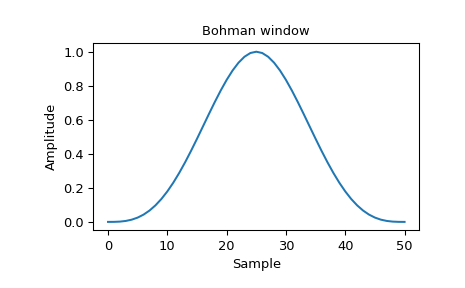
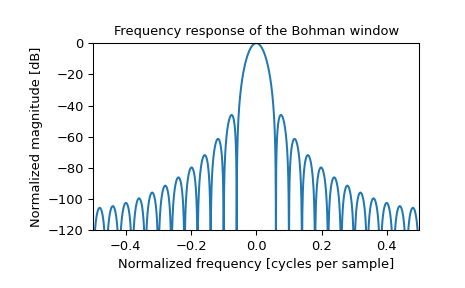
Plotten Sie das Fenster und seine Frequenzantwort
>>> import numpy as np
>>> from scipy import signal
>>> from scipy.fft import fft, fftshift
>>> import matplotlib.pyplot as plt
>>> window = signal.windows.bohman(51)
>>> plt.plot(window)
>>> plt.title("Bohman window")
>>> plt.ylabel("Amplitude")
>>> plt.xlabel("Sample")
>>> plt.figure()
>>> A = fft(window, 2047) / (len(window)/2.0)
>>> freq = np.linspace(-0.5, 0.5, len(A))
>>> response = 20 * np.log10(np.abs(fftshift(A / abs(A).max())))
>>> plt.plot(freq, response)
>>> plt.axis([-0.5, 0.5, -120, 0])
>>> plt.title("Frequency response of the Bohman window")
>>> plt.ylabel("Normalized magnitude [dB]")
>>> plt.xlabel("Normalized frequency [cycles per sample]")