
scipy.special.tklmbda#
- scipy.special.tklmbda(x, lmbda, out=None) = <ufunc 'tklmbda'>#
Kumulative Verteilungsfunktion der Tukey-Lambda-Verteilung.
- Parameter:
- x, lmbdaarray_like
Parameter
- outndarray, optional
Optionales Ausgabe-Array für die Funktionsergebnisse
- Rückgabe:
- cdfscalar oder ndarray
Wert der Tukey-Lambda-CDF
Siehe auch
scipy.stats.tukeylambdaTukey-Lambda-Verteilung
Beispiele
>>> import numpy as np
>>> import matplotlib.pyplot as plt
>>> from scipy.special import tklmbda, expit
Berechnet die kumulative Verteilungsfunktion (CDF) der Tukey-Lambda-Verteilung an mehreren
x-Werten fürlmbda= -1,5.>>> x = np.linspace(-2, 2, 9) >>> x array([-2. , -1.5, -1. , -0.5, 0. , 0.5, 1. , 1.5, 2. ]) >>> tklmbda(x, -1.5) array([0.34688734, 0.3786554 , 0.41528805, 0.45629737, 0.5 , 0.54370263, 0.58471195, 0.6213446 , 0.65311266])
Wenn
lmbda0 ist, ist die Funktion die logistische Sigmoidfunktion, die inscipy.specialalsexpitimplementiert ist.>>> tklmbda(x, 0) array([0.11920292, 0.18242552, 0.26894142, 0.37754067, 0.5 , 0.62245933, 0.73105858, 0.81757448, 0.88079708]) >>> expit(x) array([0.11920292, 0.18242552, 0.26894142, 0.37754067, 0.5 , 0.62245933, 0.73105858, 0.81757448, 0.88079708])
Wenn
lmbda1 ist, ist die Tukey-Lambda-Verteilung gleichmäßig auf dem Intervall [-1, 1], sodass die CDF linear ansteigt.>>> t = np.linspace(-1, 1, 9) >>> tklmbda(t, 1) array([0. , 0.125, 0.25 , 0.375, 0.5 , 0.625, 0.75 , 0.875, 1. ])
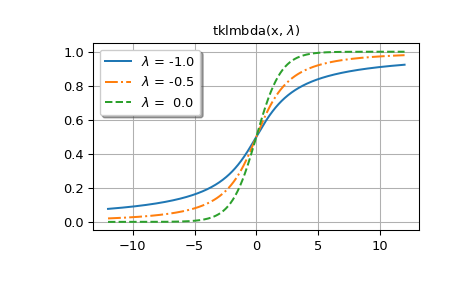
Im Folgenden generieren wir Grafiken für mehrere Werte von
lmbda.Die erste Abbildung zeigt Diagramme für
lmbda<= 0.>>> styles = ['-', '-.', '--', ':'] >>> fig, ax = plt.subplots() >>> x = np.linspace(-12, 12, 500) >>> for k, lmbda in enumerate([-1.0, -0.5, 0.0]): ... y = tklmbda(x, lmbda) ... ax.plot(x, y, styles[k], label=rf'$\lambda$ = {lmbda:-4.1f}')
>>> ax.set_title(r'tklmbda(x, $\lambda$)')
>>> ax.set_label('x')
>>> ax.legend(framealpha=1, shadow=True)
>>> ax.grid(True)
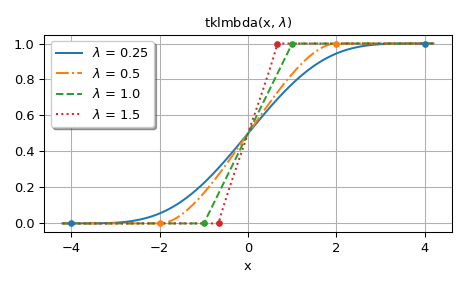
Die zweite Abbildung zeigt Diagramme für
lmbda> 0. Die Punkte in den Diagrammen zeigen die Grenzen des Trägers der Verteilung.>>> fig, ax = plt.subplots() >>> x = np.linspace(-4.2, 4.2, 500) >>> lmbdas = [0.25, 0.5, 1.0, 1.5] >>> for k, lmbda in enumerate(lmbdas): ... y = tklmbda(x, lmbda) ... ax.plot(x, y, styles[k], label=fr'$\lambda$ = {lmbda}')
>>> ax.set_prop_cycle(None)
>>> for lmbda in lmbdas:
...     ax.plot([-1/lmbda, 1/lmbda], [0, 1], '.', ms=8)
>>> ax.set_title(r'tklmbda(x, $\lambda$)')
>>> ax.set_xlabel('x')
>>> ax.legend(framealpha=1, shadow=True)
>>> ax.grid(True)
>>> plt.tight_layout()
>>> plt.show()
Die CDF der Tukey-Lambda-Verteilung ist auch als
cdf-Methode vonscipy.stats.tukeylambdaimplementiert. Im Folgenden berechnentukeylambda.cdf(x, -0.5)undtklmbda(x, -0.5)dieselben Werte>>> from scipy.stats import tukeylambda >>> x = np.linspace(-2, 2, 9)
>>> tukeylambda.cdf(x, -0.5)
array([0.21995157, 0.27093858, 0.33541677, 0.41328161, 0.5       ,
       0.58671839, 0.66458323, 0.72906142, 0.78004843])
>>> tklmbda(x, -0.5)
array([0.21995157, 0.27093858, 0.33541677, 0.41328161, 0.5       ,
       0.58671839, 0.66458323, 0.72906142, 0.78004843])
Die Implementierung in
tukeylambdabietet auch Lage- und Skalenparameter sowie andere Methoden wiepdf()(die Wahrscheinlichkeitsdichtefunktion) undppf()(die Umkehrfunktion der CDF). Für die Arbeit mit der Tukey-Lambda-Verteilung isttukeylambdadaher im Allgemeinen nützlicher. Der Hauptvorteil vontklmbdaist, dass es deutlich schneller ist alstukeylambda.cdf.